Note
Go to the end to download the full example code.
Lid-Driven Cavity Flow using foamlib.
This example demonstrates how to set up and run the classic lid-driven cavity flow simulation using foamlib with OpenFOAM and visualize results with PyVista.
The cavity flow is a standard benchmark problem in computational fluid dynamics where the top wall of a square cavity moves with a constant velocity while all other walls are stationary.
This example uses foamlib to download tutorial data, generate mesh, and visualize it.
Requirements:
OpenFOAM installed via APT:
sudo apt install openfoam openfoam-examplesOr openfoam-app: https://github.com/gerlero/openfoam-app
Reference: OpenFOAM tutorial at tutorials/incompressible/icoFoam/cavity/cavity
Setup and Imports
Import necessary libraries for case setup, simulation, and visualization.
import logging
import tempfile
from pathlib import Path

import foamlib
import pyvista as pv

from awesome_foamlib import download_cavity_tutorial

# Configure logging
logging.basicConfig(level=logging.INFO, format="%(message)s")
logger = logging.getLogger(__name__)

# Create working directory
work_dir = Path(tempfile.mkdtemp(prefix="cavity_"))
Download OpenFOAM Tutorial
Download the cavity tutorial from system or GitHub.
# Create a specific directory for the case (not a parent directory)
case_dir = work_dir / "cavity"
download_cavity_tutorial(case_dir)
logger.info("Tutorial downloaded to: %s", case_dir)
Downloading tutorial from GitHub...
Downloading system/controlDict...
Downloading system/fvSchemes...
Downloading system/fvSolution...
Downloading system/blockMeshDict...
Downloading 0/U...
Downloading 0/p...
Downloading constant/transportProperties...
Tutorial downloaded successfully to: /tmp/cavity_kyj4sl0w/cavity
Tutorial downloaded to: /tmp/cavity_kyj4sl0w/cavity
Initialize foamlib Case and Generate Mesh
Create a FoamCase object and run blockMesh to generate the computational mesh.
case = foamlib.FoamCase(case_dir)
logger.info("foamlib case initialized: %s", case.path)

# Generate mesh with blockMesh
logger.info("Generating mesh with blockMesh...")
case.block_mesh()
logger.info("Mesh generation complete!")
foamlib case initialized: /tmp/cavity_kyj4sl0w/cavity
Generating mesh with blockMesh...
(cavity) Running blockMesh... ━━━━━━━━━━━━━━━━━━━━━━━━━━━━━━━━━━━━━ 100% 0:00:00
Mesh generation complete!
Convert Mesh to VTK Format
Use foamlib to run foamToVTK for mesh conversion.
logger.info("Converting mesh to VTK format with foamToVTK...")
case.run(["foamToVTK"])
logger.info("Mesh converted to VTK successfully")
Converting mesh to VTK format with foamToVTK...
(cavity) Running foamToVTK... ━━━━━━━━━━━━━━━━━━━━━━━━━━━━━━━━━━━━━ 100% 0:00:00
Mesh converted to VTK successfully
Read and Visualize VTK Mesh with PyVista
Load the converted VTK mesh and create 3D visualization.
# Find VTK files
vtk_dir = case_dir / "VTK"
# Look for internal mesh VTU file
internal_mesh_files = list(vtk_dir.glob("*/internal.vtu"))

if not internal_mesh_files:
    msg = f"No internal mesh VTU file found in {vtk_dir}"
    raise FileNotFoundError(msg)

# Read the internal mesh VTU file
mesh_file = internal_mesh_files[0]
logger.info("Reading VTK mesh from: %s", mesh_file)
mesh = pv.read(mesh_file)

logger.info("Loaded mesh with %d points and %d cells", mesh.n_points, mesh.n_cells)
Reading VTK mesh from: /tmp/cavity_kyj4sl0w/cavity/VTK/cavity_0/internal.vtu
Loaded mesh with 882 points and 400 cells
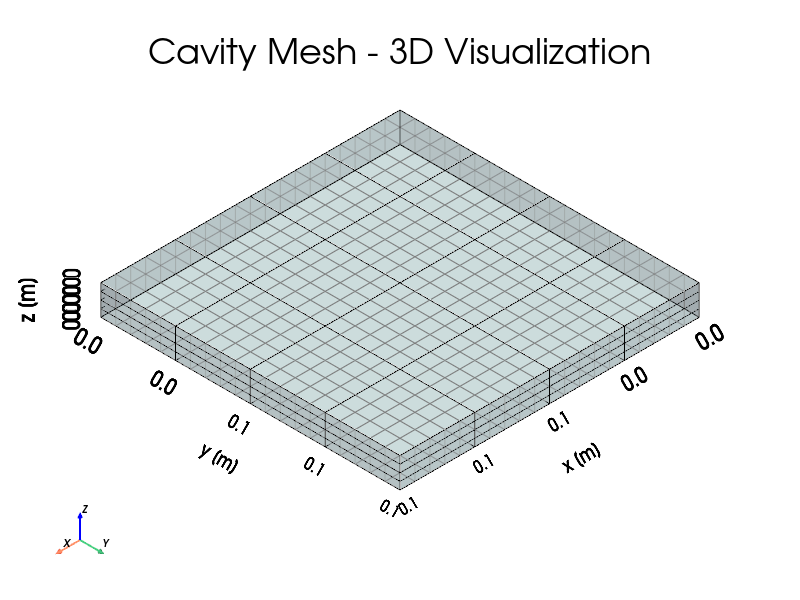
Plot Mesh with PyVista
Create an interactive 3D visualization of the mesh.
plotter = pv.Plotter(window_size=(800, 600))
plotter.enable_parallel_projection()

# Plot the mesh with edges
plotter.add_mesh(
    mesh,
    color="lightblue",
    show_edges=True,
    edge_color="black",
    line_width=1,
    opacity=0.3,
    label="Cavity Mesh",
)

plotter.add_title("Cavity Mesh - 3D Visualization", font_size=14)
plotter.add_axes()
plotter.show_bounds(
    grid="front",
    location="outer",
    all_edges=True,
    xlabel="x [m]",
    ylabel="y [m]",
    zlabel="z [m]",
)
plotter.view_isometric()
plotter.show()
/home/docs/checkouts/readthedocs.org/user_builds/awesome-foamlib/envs/latest/lib/python3.12/site-packages/pyvista/plotting/renderer.py:1972: PyVistaDeprecationWarning: `xlabel` is deprecated. Use `xtitle` instead.
  warnings.warn(
/home/docs/checkouts/readthedocs.org/user_builds/awesome-foamlib/envs/latest/lib/python3.12/site-packages/pyvista/plotting/renderer.py:1978: PyVistaDeprecationWarning: `ylabel` is deprecated. Use `ytitle` instead.
  warnings.warn(
/home/docs/checkouts/readthedocs.org/user_builds/awesome-foamlib/envs/latest/lib/python3.12/site-packages/pyvista/plotting/renderer.py:1984: PyVistaDeprecationWarning: `zlabel` is deprecated. Use `ztitle` instead.
  warnings.warn(
Mesh Statistics
Display detailed mesh information.
logger.info("\nDetailed mesh information:")
logger.info("  Total points: %d", mesh.n_points)
logger.info("  Total cells: %d", mesh.n_cells)
logger.info("  Cell types: %s", set(mesh.celltypes))
logger.info("  Domain bounds:")
logger.info("    x: [%.6f, %.6f] m", mesh.bounds[0], mesh.bounds[1])
logger.info("    y: [%.6f, %.6f] m", mesh.bounds[2], mesh.bounds[3])
logger.info("    z: [%.6f, %.6f] m", mesh.bounds[4], mesh.bounds[5])
logger.info("  Volume: %.6e m3", mesh.volume)

logger.info("\nMesh generation and visualization complete!")
logger.info("Case directory: %s", case_dir)
logger.info("VTK files: %s", vtk_dir)
logger.info("Next step: Run simulation with case.run()")
Detailed mesh information:
  Total points: 882
  Total cells: 400
  Cell types: {np.uint8(12)}
  Domain bounds:
    x: [0.000000, 0.100000] m
    y: [0.000000, 0.100000] m
    z: [0.000000, 0.010000] m
  Volume: 1.000000e-04 m3

Mesh generation and visualization complete!
Case directory: /tmp/cavity_kyj4sl0w/cavity
VTK files: /tmp/cavity_kyj4sl0w/cavity/VTK
Next step: Run simulation with case.run()
Total running time of the script: (0 minutes 6.789 seconds)